
Complex work with no room for error is the best kind to automate. GrowthRunner, the analytics tracking agency founded by Nitesh Sharoff, asked me to automate its audit process, and the result was a custom Chrome DevTools extension that cut auditing and implementation time by 90%, turning hours of manual checking into minutes.
Audits were the constraint
GrowthRunner specialises in advanced analytics and tracking for brands including Wagamama and Net-a-Porter. Audits sit at the centre of the business: they drive its lead generation, its day-to-day implementation work and its billable hours.
Each audit meant a specialist combing through a client's site, reviewing tracking events and checking every payload and implementation. The work was monotonous, but it couldn't be handed to just anyone, because it was full of edge cases and a misimplementation can cost a client hundreds of thousands. It also took hours, so the number of audits a specialist could do in a day capped how far the agency could grow.
Capturing journeys and checking events
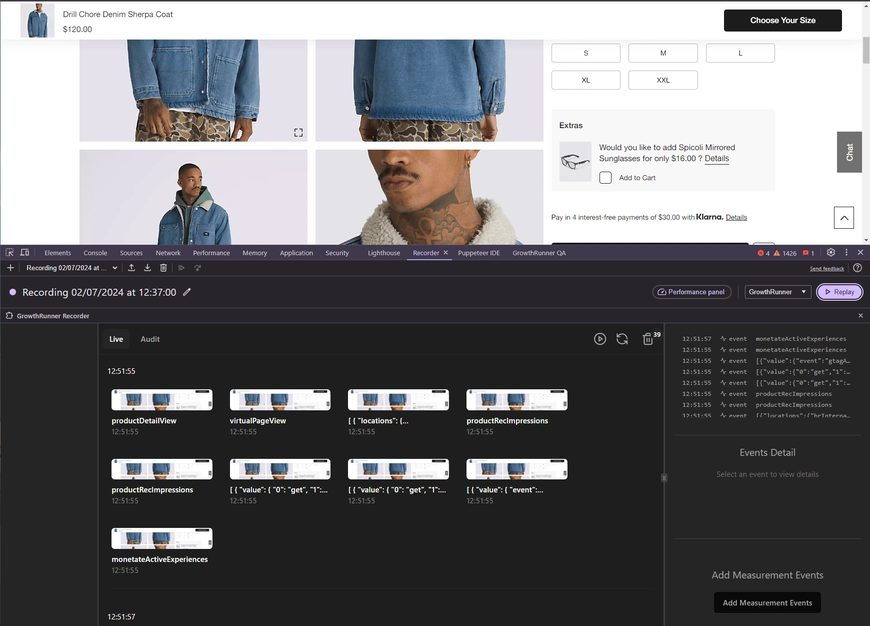
The extension uses Chrome's Recorder API to capture a user journey, including clicks and text inputs, and play it back through typical navigation. While it plays, a
dataLayer observer tracks and categorises every event.
A recording only shows that a journey happened, so the extension also matches the events that fired against the events that should have fired. The result is a snapshot of the site's analytics health, with screenshots and timestamps as evidence and a report generated automatically.
I built it with Plasmo as the extension framework, React and Tailwind CSS for the DevTools interface, TypeScript, IndexedDB for local storage, and Chrome's DevTools and Recorder APIs.
Working across browser contexts
Three parts were hard. The dataLayer observer had to watch for changes before, during and after code ran in the DevTools window. The client page and the extension's isolated world can't talk to each other directly, so the extension leans heavily on main-world JavaScript injection to pass messages between them. Extending the Recorder API to capture and replay journeys accurately was complex in its own right.
Ten audits a day per person
I delivered the MVP in 10 days. The whole project took 14 days including sales and iterations, and the extension was in production within two weeks.
Auditing time fell by 90%, from multiple hours to minutes, and each team member went from one audit a day to ten. That freed GrowthRunner's experts for strategic work, cut errors in analytics implementations and shortened the path from pitch to delivery, so the agency could take on more without hiring in proportion.
What I took from it
Specialised workflows full of edge cases can still be automated, as long as you understand the domain well enough. Two weeks of focused development can save months of time when it targets the right repetitive work, and that is still the shape of how I scope a job now, as  Build: ten business days for one agreed outcome.
A DevTools extension suits technical service businesses particularly well, because it sits inside the workflow the team already uses and can reach browser internals a web app can't. The same pattern applies to SEO, performance and security audits: automate the data collection and the report, and leave the judgement to the experts. Extensions do need upkeep, though, since browsers change their APIs and analytics platforms change their tracking.
Research and sources
Checked 2026-10-18. Next review: 2027-04-18. Listings and availability can change.
Data & Analytics, Done Right. | Growth Runner
Growth Runner · Checked 2026-10-18 · Primary source
GrowthRunner is a London data and analytics agency founded by Nitesh Sharoff, with Net-a-Porter among the brands it shows.
Plasmo
Plasmo · Checked 2026-10-18 · Primary source
Plasmo is the browser extension framework the extension was built with.
chrome.devtools.recorder
Google · Checked 2026-10-18 · Primary source
The devtools.recorder API lets an extension customise Chrome's Recorder panel, which the extension used to capture and replay user journeys.
The data layer
Google · Checked 2026-10-18 · Primary source
The dataLayer is the object Google Tag Manager reads tracking events from, which the extension observed during each journey.