You can't teach what you don't know, and you can't know what you're not constantly learning yourself. The half-life of technical knowledge is shrinking, and yesterday's breakthrough is tomorrow's baseline.
This challenge isn't unique to me. The team at a learning platform I worked with were determined to solve it, because they needed their educational content to remain relevant, fresh and aligned with industry trends.
Their goal was to create content that truly followed the zeitgeist and promoted progression by keeping up with everything happening in the digital space.
The problem: always months behind
The client's team had several problems with their manual content research workflow:
- Massive time investment: Content researchers spent 60% of their time just trying to stay current.
- Inconsistent analysis: Different researchers extracted different insights from the same content.
- Limited coverage: They could only monitor about 25 channels regularly.
- High latency: Content in specific sectors lagged anywhere from three to six months behind cutting-edge topics, a no-go when dealing with the latest LLM tooling and models.
- Subjective prioritisation: Topic selection was based on what "felt" important rather than data. The team had refined taste, but lacked a system to move faster.
The client's team didn't want to continue with manual methods and accept the risk of being perpetually behind, so they needed a technical solution to automate their research process.
Why we chose Trigger.dev: simplifying distributed processing
On previous projects, I've spent countless nights wrestling with job queues. Most developers have horror stories about production queue systems going down at 3 AM because Redis ran out of memory, or jobs silently failing because no one (ahem) set up proper dead-letter queues. You know the pain if you've ever built a system that needs to process thousands of anything.
For this project, we chose Trigger.dev from the start, which proved to be a good decision. Instead of spending weeks setting up infrastructure, we could focus entirely on solving the content analysis problem. Trigger.dev offered:
- Built-in queue management: No need to manage our own Redis instances or job persistence.
- Native batch processing: Support for processing hundreds of items in parallel.
- Concurrency controls: Fine-grained control to prevent API rate limiting.
- Robust error handling: Automatic retries and detailed error reporting.
- Development simplicity: Focus on business logic rather than infrastructure.
Our implementation was straightforward. One task takes the list of channels and fans out a scraping task per channel with batchTrigger:
export const processYouTubeChannels = task({
  id: "process-youtube-channels",
  maxDuration: 600,
  run: async (payload: ProcessYouTubeChannelsPayload) => {
    // Create batch payloads for each channel
    const channelPayloads = payload.channels.map((channel) => ({
      payload: { youtubeUrl: channel },
      options: {
        queue: {
          name: "youtube-channels",
          concurrency: 5,
        },
      },
    }));

    // Batch trigger channel scraping
    const batchResult = await scrapeYouTubeProfile.batchTrigger(
      channelPayloads
    );

    return {
      success: true,
      tasksTriggered: batchResult.runs.length,
    };
  },
});
By offloading the DevOps complexity to Trigger.dev's team (who are incredible at what they do), we could focus on building the solution the client's team needed. Trigger.dev has been a fantastic resource throughout this project, and I thoroughly recommend baking it into workflows like ours.
The one-week proof of concept: testing the waters
We designed this project as a one-week proof of concept sprint so the client's team could quickly determine whether the idea had legs without committing to an entire build. They could test the waters and, after some rigorous testing, decide whether it was the solution for them or whether we should go back and try something else.
Our proof of concept focused on building a core pipeline architecture:
- Channel discovery: Monitors YouTube channels and detects new videos.
- Video processing: Extracts transcripts and metadata from each video.
- Content analysis: Uses AI to extract structured insights from the transcript.
- Insight storage: Organises and stores the processed insights.
- Content retrieval: Provides filtered access to processed content by various criteria.
This approach allowed us to demonstrate the potential of automation without building a complete end-to-end solution. That kind of short, fixed-scope sprint is what I now sell as  Build: ten business days and £20,000 fixed, for one agreed outcome.
Multi-level batch processing: the key to scalability
One of the key technical innovations in our system is the use of multi-level batch processing for efficient scaling:
- Level 1: Process multiple channels concurrently.
- Level 2: For each channel, process multiple videos concurrently.
This approach allows us to process hundreds of videos simultaneously, dramatically reducing the time required to extract insights:
- Manual approach: 200 videos × 30 minutes per video = 100 hours (or 2.5 working weeks).
- Our system: 200 videos processed in parallel = approximately 30 minutes total.
This 200x speedup demonstrates how automation could transform the content research process for the client's team.
AI-powered content analysis: structured insights
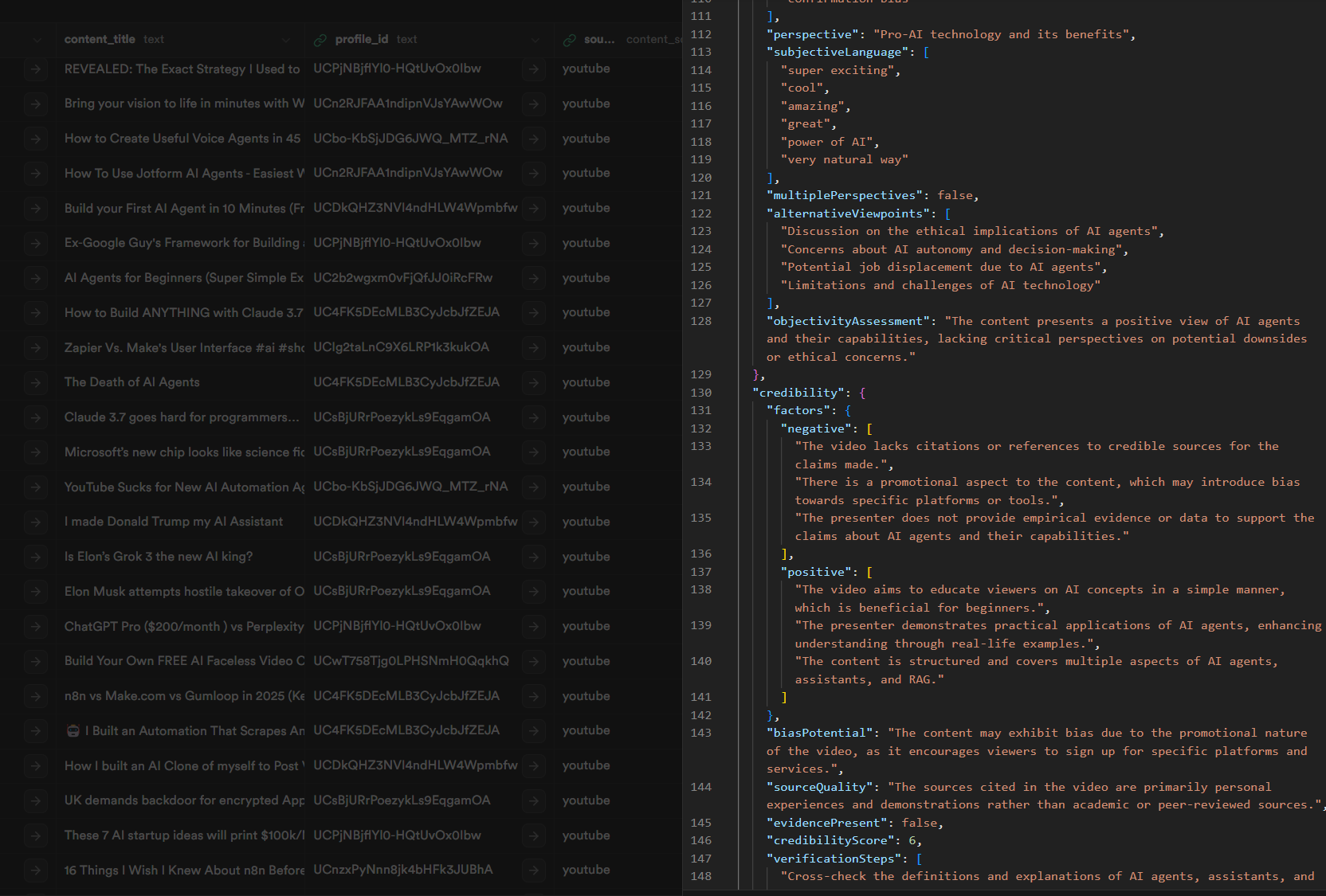
At the core of the pipeline, we use AI to analyse each video's transcript and extract structured information:
- Talking points: Key topics discussed in the content.
- Category: Primary content category (technology, business, etc.).
- Summary: Concise overview of the content.
- Keywords: Relevant terms and concepts.
- Learnings: Actionable insights users can apply.
Our initial implementation used a much simpler prompt that just asked for a summary and keywords, but the results were disappointing. The summaries were vague and generic, without the technical depth we needed, so after several iterations we landed on a more structured approach. The AI SDK's generateObject sends the transcript to
GPT-4o and only accepts an answer that matches a
Zod schema:
const response = await generateObject({
  model: openai("gpt-4o"),
  schema: z.object({
    talkingPoints: z.array(z.string()),
    category: z.string(),
    summary: z.string(),
    keywords: z.array(z.string()),
    learnings: z.array(z.string()).nullable(),
  }),
  prompt: `SECRET PROMPTING TECHNIQUES: ${markdown}`,
});
When I describe this architecture to other engineers, their first reaction is usually, "That seems straightforward." And that's exactly the point. The architecture is straightforward, almost deceptively so.
The complexity lies in the operational details: handling hundreds of parallel processes, managing API rate limits, recovering from failures and processing gigabytes of transcript data.
How a new video becomes an insight
The pipeline connects content discovery, transcript retrieval and analysis, with state tracking and caching to keep processing efficient.
Content discovery
Every six hours, a scheduler checks each channel's feed for videos it hasn't seen and queues them for processing:
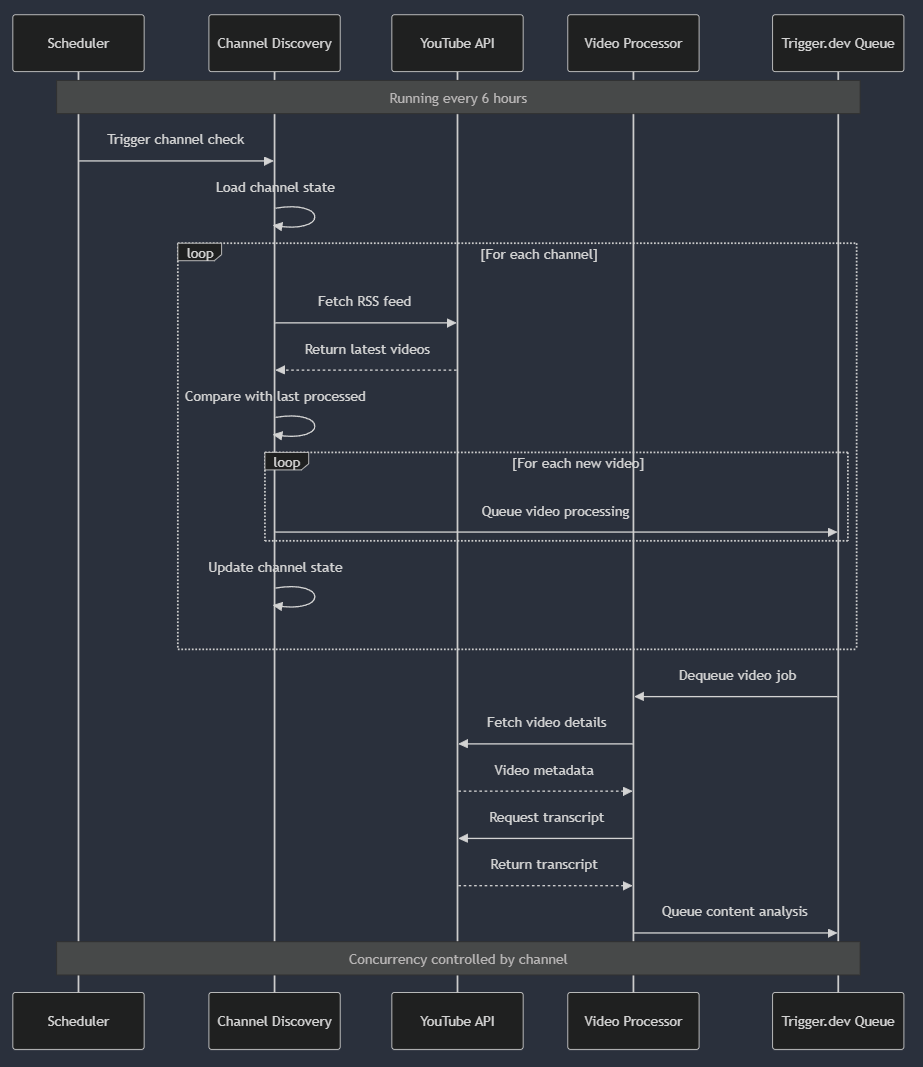
We manage discovery through batching and state tracking. The system maintains a record of the last processed video for each channel, allowing it to identify only new content that needs processing.
Content analysis
Once a video and its transcript are retrieved, the content analysis process begins:
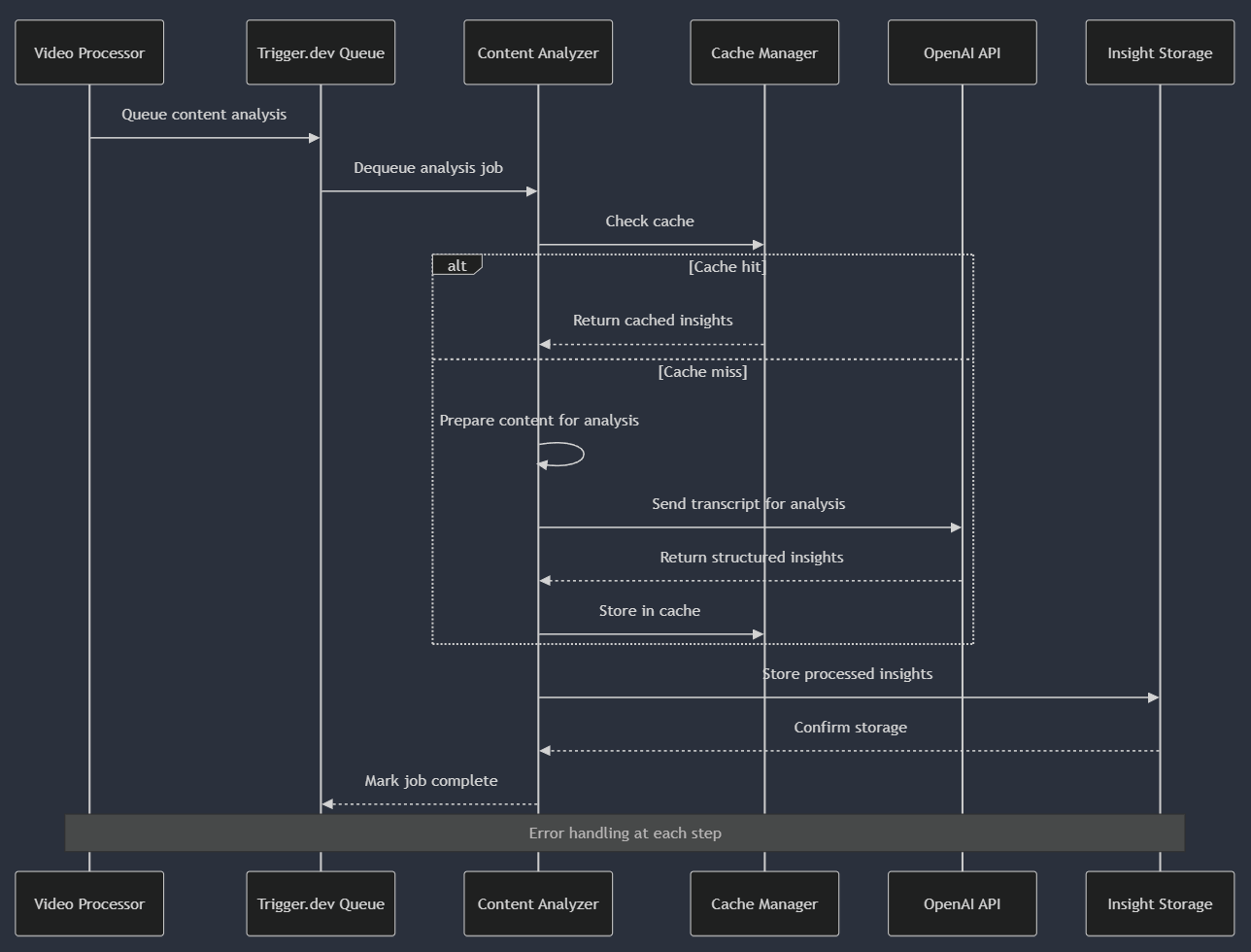
We optimise performance through caching while ensuring reliable processing. The cache dramatically reduces both processing time and API costs for repeated or similar content.
Manual and automated research
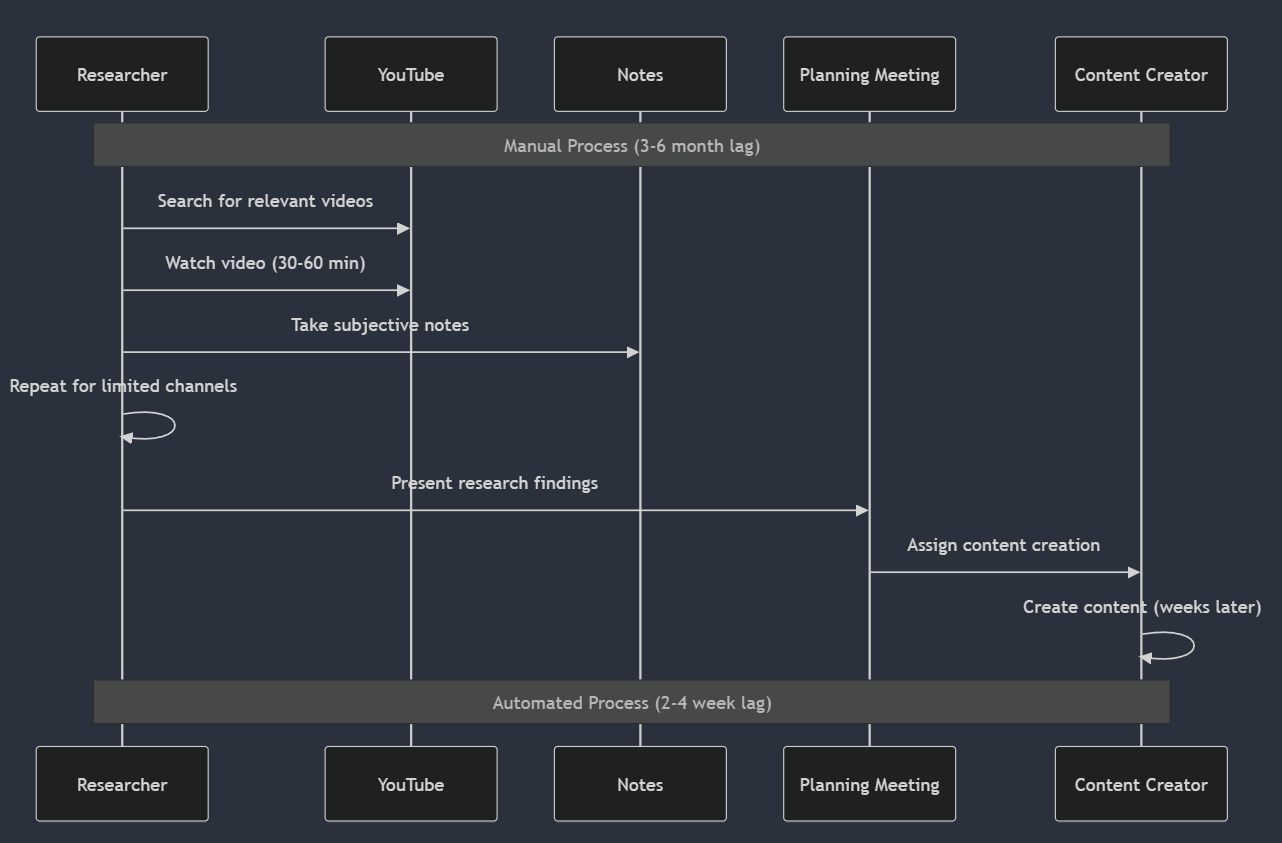
In the manual process, a person finds and watches every video, and their notes carry the whole plan:
In the automated process, the system does the watching and the planning meeting starts from a dashboard:
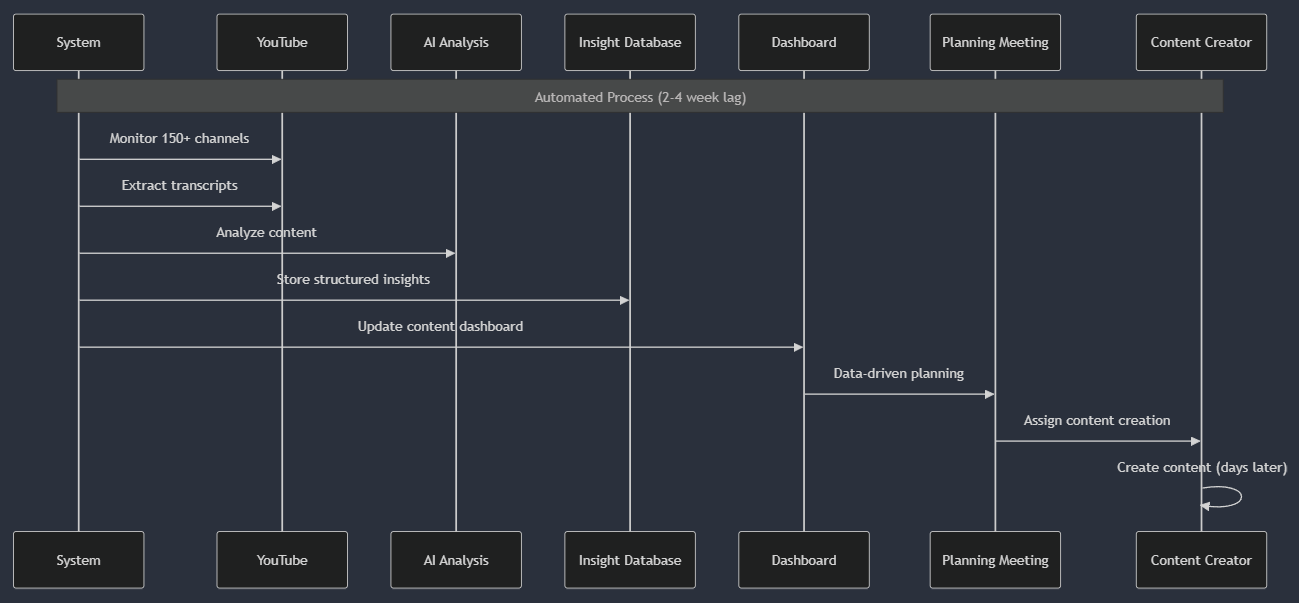
The automated flow lets us cover more ground and process content more quickly and consistently. For the client's team, that offered a way to reduce the lag between industry developments and learning content.
Staying current with frontend frameworks
Okay, great. You can skim content. Why does that matter? Consider how quickly the React ecosystem evolves. New patterns, libraries and best practices emerge constantly. A manual research process would struggle to keep up with:
- Core React updates and new features.
- Emerging patterns and community conventions.
- Framework integrations (Next.js, Remix, etc.).
- State management solutions.
- Performance optimisation techniques.
- Server component developments.
With our automated system, these developments could be tracked as they emerge, allowing content creators to plan and develop educational material that stays relevant to current industry practices instead of teaching yesterday's patterns.
Technical challenges and solutions
YouTube API rate limiting
The YouTube Data API has strict rate limits that could block our processing. We addressed this by:
- Implementing channel-based concurrency controls with a
concurrency key per channel.
- Using batch processing to optimise API usage.
- Storing processing state to avoid redundant operations.
// Channel-based concurrency control
options: {
  concurrencyKey: channelId, // Group by channel
  queue: {
    name: "youtube-channels",
    concurrency: 5, // Process up to 5 channels concurrently
  },
}
Processing long-form content
Some videos can be hours long with enormous transcripts. Our solution:
- Process transcripts in chunks to stay within API limits.
- Extract the most relevant sections for focused analysis.
- Implement caching to prevent redundant processing.
Ensuring reliability
In a system processing thousands of videos, failures are inevitable. We implemented:
- Comprehensive error handling with structured responses.
- Detailed logging for debugging.
- State tracking to resume interrupted processing.
Again, Trigger.dev made this easy. Deceptively so. Proof of concept Skunkworks projects require extreme delivery speed and accuracy over very short bursts. Trigger.dev is one of the rare tools that does exactly that.
The universal content adapter pattern: designed for expansion
Our initial implementation focused on YouTube content, but we designed the architecture to extend to other content sources easily. We implemented a "Universal Content Adapter" pattern:
interface ContentAdapter<T, U> {
  // Extract content from source-specific format
  extract(source: T): Promise<RawContent>;

  // Normalize to unified content model
  normalize(raw: RawContent): UnifiedContent;

  // Process content through insight pipeline
  process(content: UnifiedContent): Promise<ContentInsights>;

  // Store results in format suitable for source
  store(insights: ContentInsights, metadata: U): Promise<void>;
}
This pattern makes it straightforward to add new content sources, as they all go through the same processor. We can add new sites, YouTube channels, articles and Substack posts with just a couple of lines, and Trigger.dev makes this simple through its task system and queues.
Potential impact: from manual to automated research
Based on our proof of concept, we projected the following changes to the client's content creation process:
| Before | Projected after | |
|---|---|---|
| Research time | 60% of creators' time | 15% of creators' time |
| YouTube coverage | 25 channels monitored regularly | 800+ channels monitored automatically |
| Content planning | Subjective impressions | Data-driven, based on topic frequency and trends |
| Content lag | 3 to 6 months behind the cutting edge | Supporting content the same week or even the same day; most topics 1 to 2 weeks behind at most |
This would allow their creators to focus on what they do best: creating engaging, nuanced learning experiences, rather than spending most of their time just trying to stay current.
From proof of concept to production
The one-week proof of concept successfully demonstrated the potential of an automated content intelligence system, but there was still work to do before production:
- Building the content dashboard: Developing a user interface to visualise trends and insights.
- Expanding to additional content sources: Adding LinkedIn, Twitter and technical blogs.
- Enhancing the insight extraction: Further refining the AI analysis for specific content types.
- Implementing user feedback loops: Allowing content creators to rate and improve insights.
- Integrating with existing content management systems: Streamlining the workflow from insight to content.
Lessons learned: balancing automation and expertise
Throughout this proof of concept, we learned several key lessons about content intelligence automation:
- Focus on core problems, not infrastructure: Tools like Trigger.dev let us spend time on our actual content analysis problems rather than queue management.
- Pipeline architectures provide flexibility: Breaking complex processes into composable tasks makes the system more resilient and extensible.
- Smart concurrency is crucial for scaling: Understanding resource constraints and applying targeted concurrency controls is essential for reliable scaling.
- Structured analysis yields better results: Providing structure to AI analysis produces more consistent, actionable insights.
- Universal adapters enable expansion: Our design makes it straightforward to add new content sources, and they all go through the same processor. Trigger.dev simplifies scaling with its task system and queues.
The most important lesson was finding the right balance between automation and human expertise. The system isn't meant to replace editorial judgement. The pipeline does the watching and research every day, so the experts can focus on higher-level analysis, curation and teaching, and the editorial calls stay theirs.
The same approach can also support competitive intelligence, trend analysis and market research.
Research and sources
Checked 2026-10-18. Next review: 2027-04-18. Listings and availability can change.
Trigger.dev · Checked 2026-10-18 · Primary source
Trigger.dev is the open-source background jobs platform the pipeline's tasks and queues ran on.
Trigger.dev · Checked 2026-10-18 · Primary source
Trigger.dev tasks can be started in batches with batchTrigger, which the channel task uses to fan out work.
Trigger.dev · Checked 2026-10-18 · Primary source
Trigger.dev queues take a concurrency limit and a concurrencyKey, which the pipeline used to group work by channel.
YouTube Data API overview
Google for Developers · Checked 2026-10-18 · Primary source
The YouTube Data API is the API the pipeline fetched video details from, and it is metered by a quota.
GPT-4o model
OpenAI · Checked 2026-10-18 · Primary source
GPT-4o is the OpenAI model the analysis step called.
Generating structured data
Vercel · Checked 2026-10-18 · Primary source
The AI SDK's generateObject returns output that matches a schema, which is how the analysis step got structured insights.
Zod
Zod · Checked 2026-10-18 · Primary source
Zod is the TypeScript schema library used to define the shape of each video's insights.